HP Sprocket Studio Plus vs Epson SureColour SC-P700
Detailed Technical Comparison & Buying Guide
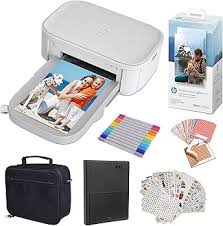 HP Sprocket Studio Plus
 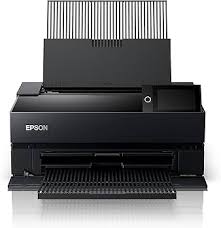 Epson SureColour SC-P700
 HP Sprocket Studio Plus
Epson SureColour SC-P700
| Feature | HP Sprocket Studio Plus | Epson SureColour SC-P700 |
|---|---|---|
| Print Technology | Dye-sublimation | UltraChrome Pro10 Ink |
| Colour Output | Color | 10 Colours (incl. Violet) |
| Print Resolution | 300 dpi | 5760 x 1440 dpi |
| Black Print Speed (PPM) | N/A | 2 min (A3+ Photo) |
| Colour Print Speed (PPM) | 60 sec per print | 2 min (A3+ Photo) |
| First Page Out Time | Instant (Bluetooth) | N/A |
| Auto Double-Sided | Manual | Manual |
| Input Paper Capacity | 20 Sheets (Studio Paper) | 120 Sheets (Plain), 30 (Photo) |
| Output Tray Capacity | Single Sheet Output | 50 Sheets |
| Supported Paper Sizes | 10 x 15 cm (4x6 inch) | A3+, A3, A4, A5, Roll Paper |
| Paper Weight Support | Dedicated Studio Paper | Up to 1.5mm thickness |
| Scanner Type | None | None |
| Scan Resolution | N/A | N/A |
| Auto Document Feeder | None | None |
| Copy Speed | None | None |
| Wi-Fi Connectivity | Bluetooth 5.0 | 802.11a/b/g/n/ac |
| Ethernet Support | No | 10/100/1000 Ethernet |
| USB Connectivity | Micro USB (Power) | SuperSpeed USB 3.0 |
| Mobile Printing Support | HP Sprocket App | Epson Smart Panel App |
| Display Panel | LED Status Light | 10.9 cm Colour Touchscreen |
| Monthly Duty Cycle | Casual Photo Sharing | Professional Exhibition |
| Ink/Cartridge System | Studio Plus Cartridges | T46S Series (25ml) |
| Borderless Printing | Yes | Yes (up to A3+) |
| Width | 169 mm | 515 mm |
| Depth | 273 mm | 368 mm |
| Height | 68 mm | 185 mm |
| Machine Weight | 0.93 kg | 12.6 kg |
| Energy Efficiency | Auto-Off Technology | Low Power Mode |
| Noise Level (dB) | 40 dB(A) | 39 dB(A) |
| Processor Speed | N/A | Professional Engine |
| Internal Memory | Internal Cache | 1 GB |
| Cloud Print Support | Google Photos, Instagram | Direct Cloud Access |
| Security Features | Bluetooth Pairing | Enterprise Security |
| Compatible OS | iOS, Android | Windows, macOS |
| Included in Box | Sprocket Studio Plus, Adapter | Full Ink Set, Maintenance Box |
| Warranty Period | 1 Year Limited | 1 Year On-site |
| Recommended Use | Smartphone Photographers | Gallery/Professional Photo |
⚖️ Expert Verdict
It is rare to see two printers that occupy such polar opposite ends of the photographic spectrum. The Epson Surecolour SC-P700 is a professional A3+ gallery printer using 10 pigment inks to achieve museum-grade archival longevity and breathtaking deep blacks. On the other hand, the HP Sprocket Studio Plus is a consumer-grade dye-sublimation device designed for quick 4x6 snapshots from a smartphone. While the Sprocket is fun for parties and instant physical memories, it offers zero creative control over colour profiles or paper types. The Epson P700 is a large desktop investment that allows photographers to print on thick fine-art papers and even canvas with exacting precision. Using the Sprocket is as simple as pressing a button on an app, but the resulting prints lack the resolution and tonal range of the Epson. The P700 is built for artists who intend to sell their work or display it in exhibitions. For those who just want smudge-proof stickers for a fridge or a scrapbook, the HP is a charming gadget. However, in any discussion regarding print quality or professional utility, the Epson SC-P700 is the undisputed winner.