Lexmark B2236dw vs Xerox Phaser 3020
Detailed Technical Comparison & Buying Guide
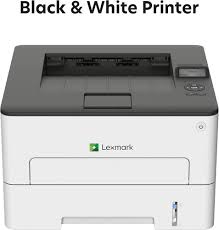 Lexmark B2236dw
 VS
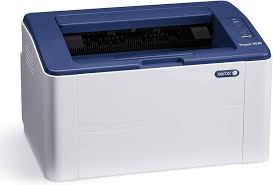 Xerox Phaser 3020
 Lexmark B2236dw
✅ Compact size but very high print speed.
❌ Replacement toners can be pricey.
Xerox Phaser 3020
✅ Very small and fits in tight spaces.
❌ Slower than most other laser printers.
| Feature | Lexmark B2236dw | Xerox Phaser 3020 |
|---|---|---|
| Print Technology | Mono Laser | Mono Laser |
| Colour Output | N/A | N/A |
| Print Resolution | N/A | N/A |
| Black Print Speed (PPM) | 34 ppm | 20 ppm |
| Colour Print Speed (PPM) | N/A | N/A |
| First Page Out Time | 7.9 sec | 8.5 sec |
| Auto Double-Sided | Automatic | Manual |
| Input Paper Capacity | 250 Sheets | 150 Sheets |
| Output Tray Capacity | 150 Sheets | 100 Sheets |
| Supported Paper Sizes | A4, A5, A6, B5, LGL | N/A |
| Paper Weight Support | N/A | N/A |
| Scanner Type | N/A | N/A |
| Scan Resolution | N/A | N/A |
| Auto Document Feeder | N/A | N/A |
| Copy Speed | N/A | N/A |
| Wi-Fi Connectivity | Yes | Yes |
| Ethernet Support | N/A | N/A |
| USB Connectivity | N/A | N/A |
| Mobile Printing Support | N/A | N/A |
| Display Panel | N/A | N/A |
| Monthly Duty Cycle | 30,000 pages | 15,000 pages |
| Ink/Cartridge System | B222000 Toner | 106R02773 Toner |
| Borderless Printing | N/A | N/A |
| Width | 355 mm | 331 mm |
| Depth | 333 mm | 215 mm |
| Height | 215 mm | 188 mm |
| Machine Weight | 6.8 kg | 4.1 kg |
| Energy Efficiency | N/A | N/A |
| Noise Level (dB) | N/A | N/A |
| Processor Speed | 1 GHz | 600 MHz |
| Internal Memory | 256 MB | 128 MB |
| Cloud Print Support | N/A | N/A |
| Security Features | N/A | N/A |
| Compatible OS | N/A | N/A |
| Included in Box | N/A | N/A |
| Warranty Period | N/A | N/A |
| Recommended Use | N/A | N/A |
⚖️ Expert Verdict
The Phaser 3020 is a basic legacy printer, while the Lexmark B2236dw is a modern office tool. Lexmark sorts you out with auto-duplexing and faster speeds, making the Phaser look right slow and dated. For a real workload, the Lexmark B2236dw is the undisputed winner. It saves you paper, time, and stress. The Phaser is okay as a backup, but for your primary printer, the Lexmark is the proper investment that won't leave you waiting around like you're stuck on the District Line.
What Owners Are Saying?
Lexmark B2236dw
WarehouseManager ★★★★★
Xerox Phaser 3020
RetiredTeacher ★★★☆☆