Canon PIXMA TS3350 vs Canon PIXMA TS7450i
Detailed Technical Comparison & Buying Guide
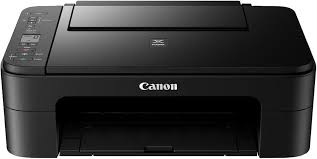 Canon PIXMA TS3350
 VS
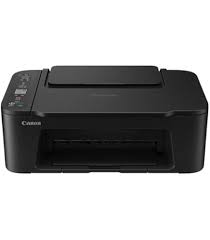 Canon PIXMA TS7450i
 Canon PIXMA TS3350
✅ Extremely affordable and lightweight.
❌ Lacks auto double-sided printing.
Canon PIXMA TS7450i
✅ ADF is excellent for multi-page documents.
❌ ADF does not support auto-duplexing.
| Feature | Canon PIXMA TS3350 | Canon PIXMA TS7450i |
|---|---|---|
| Print Technology | FINE Cartridge Inkjet | Inkjet |
| Colour Output | Colour | Color |
| Print Resolution | 4800 x 1200 dpi | 4800 x 1200 dpi |
| Black Print Speed (PPM) | 7.7 ipm | 13 ipm |
| Colour Print Speed (PPM) | 4.0 ipm | 6.8 ipm |
| First Page Out Time | 11 sec | 11 sec |
| Auto Double-Sided | Manual | Automatic |
| Input Paper Capacity | 60 Sheets (Rear Tray) | 100 Sheets (Front), 100 (Rear) |
| Output Tray Capacity | 20 Sheets | 40 Sheets |
| Supported Paper Sizes | A4, A5, B5, LTR, LGL | A4, A5, B5, LTR |
| Paper Weight Support | 64 to 105 g/m² | 64 to 300 g/m² |
| Scanner Type | CIS Flatbed Photo/Doc | Flatbed, ADF |
| Scan Resolution | 600 x 1200 dpi | 1200 x 2400 dpi |
| Auto Document Feeder | None | 35 Sheets (Simplex) |
| Copy Speed | Approx. 3.0 ipm | Approx 4.0 ipm |
| Wi-Fi Connectivity | Wi-Fi, Access Point Mode | Wi-Fi, Bluetooth |
| Ethernet Support | No | No |
| USB Connectivity | Hi-Speed USB (B Port) | USB Hi-Speed |
| Mobile Printing Support | Canon PRINT app, Mopria | Canon PRINT App |
| Display Panel | 3.8cm LCD Segment Mono | OLED (1.44 inch) |
| Monthly Duty Cycle | 500 pages | 1,500 pages |
| Ink/Cartridge System | PG-545 / CL-546 Cartridges | PG-560 / CL-561 |
| Borderless Printing | Yes (10x15cm) | Yes |
| Width | 435 mm | 403 mm |
| Depth | 316 mm | 364 mm |
| Height | 145 mm | 206 mm |
| Machine Weight | 3.9 kg | 8.2 kg |
| Energy Efficiency | Auto Power Off/On | Auto Power Off |
| Noise Level (dB) | 53.5 dB(A) | 44 dB(A) |
| Processor Speed | Integrated Process | N/A |
| Internal Memory | 64 MB | 128 MB |
| Cloud Print Support | PIXMA Cloud Link | PIXMA Cloud Link |
| Security Features | WPA2-PSK | Standard Encryption |
| Compatible OS | Windows, macOS, ChromeOS | Windows, macOS |
| Included in Box | FINE Cartridges, Power Cord | Ink, Power Cable, Manual |
| Warranty Period | 1 Year | 1 Year |
| Recommended Use | Budget Home Printing | Home Office Scan Heavy |
⚖️ Expert Verdict
If you are considering the TS3350 because of the price tag, please look at the TS7450i instead. The TS7450i includes an Automatic Document Feeder (ADF) and auto-duplexing, which are essential tools for a productive home. The TS3350 is a manual nightmare for multi-page jobs. While both use expensive cartridges, the TS7450i’s efficiency in handling documents means you waste less paper and time. The TS7450i is the winner because it actually functions as a home office tool, whereas the TS3350 is barely suitable for anything beyond a single-page return label once a month.
What Owners Are Saying?
Canon PIXMA TS3350
Molly ★★★★☆
Edward ★★☆☆☆
Theodore ★★★☆☆
Canon PIXMA TS7450i
LondonDesign ★★★★★
George ★★★☆☆