Creality K1 Max vs AnkerMake M5
Detailed Technical Comparison & Buying Guide
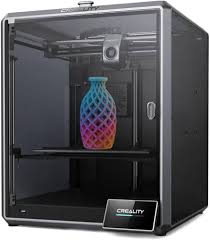 Creality K1 Max
 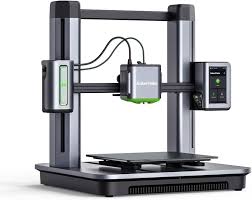 AnkerMake M5
 Creality K1 Max
AnkerMake M5
| Feature | Creality K1 Max | AnkerMake M5 |
|---|---|---|
| Printing Technology | FDM (CoreXY) | FDM |
| Build Volume (XYZ) | 300 x 300 x 300 mm³ | 235 x 235 x 250 mm³ |
| Chassis Structure | Die-cast Aluminum Alloy | N/A |
| Enclosure Material | Enclosed with Glass Panels | N/A |
| Hotend Design | High-flow Ceramic Heater | N/A |
| Extruder Gear Type | Dual-gear Direct Drive | N/A |
| Nozzle Material | Hardened Steel | N/A |
| Max Nozzle Temp | 300 °C | N/A |
| Nozzle Diameter | 0.4 mm | N/A |
| Filament Diameter | 1.75 mm | N/A |
| Build Plate Surface | Flexible Steel Plate | N/A |
| Max Bed Temp | 120 °C | N/A |
| Max Printing Speed | 600 mm/s | 500 mm/s |
| Max Acceleration | 20,000 mm/s² | N/A |
| Max Volumetric Flow | 32 mm³/s | N/A |
| Cooling System | Dual Part Cooling Fans | N/A |
| Air Filtration | HEPA Filter | N/A |
| Supported Materials | PLA, PETG, ABS, ASA, PA, TPU | N/A |
| LiDAR Sensor | AI LiDAR Included | N/A |
| Chamber Camera | AI Camera Included | N/A |
| Filament Run-out Sensor | Yes | N/A |
| Power Loss Recovery | Yes | N/A |
| Physical Dimensions | 435 x 462 x 526 mm³ | N/A |
| Product Weight | 18 kg | 12.6 kg |
| Input Voltage | 100-240 VAC | N/A |
| Peak Power Draw | 1000 W | N/A |
| Control Panel / Display | 4.3-inch Colour Touchscreen | 4.3-inch Touchscreen |
| Connectivity Options | Wi-Fi, Ethernet, USB Drive | Wi-Fi, USB-C, App |
| Internal Storage | 8 GB ROM | 8 GB Flash |
| Motion Controller CPU | Dual-core 1.2GHz CPU | N/A |
| Application Processor | N/A | N/A |
| AI Neural Processing | N/A | N/A |
| Recommended Slicer | Creality Print, Cura, OrcaSlicer | AnkerMake Slicer, Cura |
| Supported OS | Windows, macOS, Linux | N/A |
| Bed Leveling System | Hands-free Auto Leveling | 49-point Auto Leveling |
| Enclosure Type | N/A | N/A |
| Vibration Compensation | Input Shaping (G-Sensor) | N/A |
| AI Monitoring Features | Spaghetti Detection & LiDAR Scan | Spaghetti Detection & Real-time Alerts |
| Multi-Material Support | N/A | N/A |
| Manufacturer Warranty | 1 Year | 1 Year |
| Box Contents | K1 Max, AI Camera, LiDAR, Tools, 1kg Filament | M5 Printer, Camera, PEI Plate, Tools |
⚖️ Expert Verdict
This comparison highlights the difference between a stylish desktop printer and a massive, industrial-leaning workhorse. The AnkerMake M5 is perfect for small-to-medium decorative items, but the Creality K1 Max offers a significantly larger build volume of 300mm cubed. Because the K1 Max is a fully enclosed CoreXY printer, it is much better suited for printing large mechanical parts and helmets that would warp on an open-frame printer like the Anker. Creality has also packed the K1 Max with LIDAR and an AI camera, matching or exceeding the smart features found in the Anker. While the Anker is much more attractive for a desktop setup, the K1 Max is the more capable tool for serious makers and engineering students. The K1 Max's ability to reach 600mm/s print speeds while maintaining stability within its heavy frame is truly impressive. Unless space is your only constraint, the K1 Max provides more room for your projects to grow. The Anker is better for casual use, but the K1 Max wins on sheer utility.