Bambu Lab P1S vs AnkerMake M5
Detailed Technical Comparison & Buying Guide
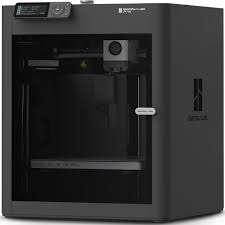 Bambu Lab P1S
 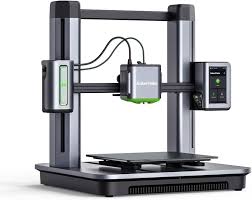 AnkerMake M5
 Bambu Lab P1S
AnkerMake M5
| Feature | Bambu Lab P1S | AnkerMake M5 |
|---|---|---|
| Printing Technology | FDM (CoreXY) | FDM |
| Build Volume (XYZ) | 256 x 256 x 256 mm³ | 235 x 235 x 250 mm³ |
| Chassis Structure | N/A | N/A |
| Enclosure Material | N/A | N/A |
| Hotend Design | N/A | N/A |
| Extruder Gear Type | N/A | N/A |
| Nozzle Material | N/A | N/A |
| Max Nozzle Temp | 300 °C | N/A |
| Nozzle Diameter | N/A | N/A |
| Filament Diameter | N/A | N/A |
| Build Plate Surface | N/A | N/A |
| Max Bed Temp | 100 °C | N/A |
| Max Printing Speed | 500 mm/s | 500 mm/s |
| Max Acceleration | 20,000 mm/s² | N/A |
| Max Volumetric Flow | N/A | N/A |
| Cooling System | N/A | N/A |
| Air Filtration | Activated Carbon Filter | N/A |
| Supported Materials | PLA, PETG, TPU, ABS, ASA, PA, PC | N/A |
| LiDAR Sensor | N/A | N/A |
| Chamber Camera | N/A | N/A |
| Filament Run-out Sensor | Yes | N/A |
| Power Loss Recovery | N/A | N/A |
| Physical Dimensions | N/A | N/A |
| Product Weight | 12.95 kg | 12.6 kg |
| Input Voltage | N/A | N/A |
| Peak Power Draw | N/A | N/A |
| Control Panel / Display | 2.7-inch LCD with Dial | 4.3-inch Touchscreen |
| Connectivity Options | Wi-Fi, Bluetooth, Bambu-Bus | Wi-Fi, USB-C, App |
| Internal Storage | N/A | 8 GB Flash |
| Motion Controller CPU | N/A | N/A |
| Application Processor | N/A | N/A |
| AI Neural Processing | N/A | N/A |
| Recommended Slicer | N/A | AnkerMake Slicer, Cura |
| Supported OS | N/A | N/A |
| Bed Leveling System | N/A | 49-point Auto Leveling |
| Enclosure Type | Fully Enclosed (Plastic & Glass) | N/A |
| Vibration Compensation | Yes | N/A |
| AI Monitoring Features | N/A | Spaghetti Detection & Real-time Alerts |
| Multi-Material Support | AMS Compatible (up to 16 colours) | N/A |
| Manufacturer Warranty | 1 Year | 1 Year |
| Box Contents | P1S, Build Plate, Spare Nozzle, Scraper | M5 Printer, Camera, PEI Plate, Tools |
⚖️ Expert Verdict
When comparing the AnkerMake M5 to the Bambu Lab P1S, the primary differentiator is the printing environment and material versatility. The AnkerMake M5 is an open-frame printer, which is excellent for PLA but struggles with temperature-sensitive materials like ABS or ASA due to room drafts. The Bambu Lab P1S comes fully enclosed right out of the box, featuring integrated fans and an activated carbon filter to manage fumes and heat. This enclosure allows the P1S to print professional-grade engineering plastics with much less risk of warping or cracking. Furthermore, the P1S is significantly quieter during operation because its panels muffle the sound of the high-speed motors. While the Anker is faster to set up initially, the P1S offers a much more reliable 'set and forget' experience for complex prints. The P1S also supports the AMS for multi-colour printing, which is a game-changer for creative projects. For anyone looking to move beyond basic hobby printing, the P1S is the superior and more capable machine.