Creality K1 Max vs Bambu Lab P1S
Detailed Technical Comparison & Buying Guide
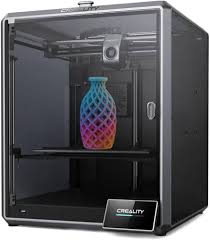 Creality K1 Max
 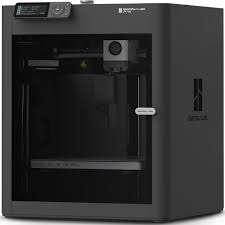 Bambu Lab P1S
 Creality K1 Max
Bambu Lab P1S
| Feature | Creality K1 Max | Bambu Lab P1S |
|---|---|---|
| Printing Technology | FDM (CoreXY) | FDM (CoreXY) |
| Build Volume (XYZ) | 300 x 300 x 300 mm³ | 256 x 256 x 256 mm³ |
| Chassis Structure | Die-cast Aluminum Alloy | N/A |
| Enclosure Material | Enclosed with Glass Panels | N/A |
| Hotend Design | High-flow Ceramic Heater | N/A |
| Extruder Gear Type | Dual-gear Direct Drive | N/A |
| Nozzle Material | Hardened Steel | N/A |
| Max Nozzle Temp | 300 °C | 300 °C |
| Nozzle Diameter | 0.4 mm | N/A |
| Filament Diameter | 1.75 mm | N/A |
| Build Plate Surface | Flexible Steel Plate | N/A |
| Max Bed Temp | 120 °C | 100 °C |
| Max Printing Speed | 600 mm/s | 500 mm/s |
| Max Acceleration | 20,000 mm/s² | 20,000 mm/s² |
| Max Volumetric Flow | 32 mm³/s | N/A |
| Cooling System | Dual Part Cooling Fans | N/A |
| Air Filtration | HEPA Filter | Activated Carbon Filter |
| Supported Materials | PLA, PETG, ABS, ASA, PA, TPU | PLA, PETG, TPU, ABS, ASA, PA, PC |
| LiDAR Sensor | AI LiDAR Included | N/A |
| Chamber Camera | AI Camera Included | N/A |
| Filament Run-out Sensor | Yes | Yes |
| Power Loss Recovery | Yes | N/A |
| Physical Dimensions | 435 x 462 x 526 mm³ | N/A |
| Product Weight | 18 kg | 12.95 kg |
| Input Voltage | 100-240 VAC | N/A |
| Peak Power Draw | 1000 W | N/A |
| Control Panel / Display | 4.3-inch Colour Touchscreen | 2.7-inch LCD with Dial |
| Connectivity Options | Wi-Fi, Ethernet, USB Drive | Wi-Fi, Bluetooth, Bambu-Bus |
| Internal Storage | 8 GB ROM | N/A |
| Motion Controller CPU | Dual-core 1.2GHz CPU | N/A |
| Application Processor | N/A | N/A |
| AI Neural Processing | N/A | N/A |
| Recommended Slicer | Creality Print, Cura, OrcaSlicer | N/A |
| Supported OS | Windows, macOS, Linux | N/A |
| Bed Leveling System | Hands-free Auto Leveling | N/A |
| Enclosure Type | N/A | Fully Enclosed (Plastic & Glass) |
| Vibration Compensation | Input Shaping (G-Sensor) | Yes |
| AI Monitoring Features | Spaghetti Detection & LiDAR Scan | N/A |
| Multi-Material Support | N/A | AMS Compatible (up to 16 colours) |
| Manufacturer Warranty | 1 Year | 1 Year |
| Box Contents | K1 Max, AI Camera, LiDAR, Tools, 1kg Filament | P1S, Build Plate, Spare Nozzle, Scraper |
⚖️ Expert Verdict
This comparison puts the most polished mid-range printer against the most feature-packed large-format printer. The Bambu Lab P1S is widely regarded for its exceptional software and mechanical reliability, but it is limited by a standard 256mm build volume. The Creality K1 Max counters with a massive 300mm cubed build area, an integrated LIDAR sensor, and an AI camera included in the price. Because the K1 Max is also fully enclosed, it competes directly with the P1S on material versatility, but with the added benefit of being able to print large helmets or mechanical housings in one piece. While Bambu’s software is more refined, Creality’s K1 Max is open to third-party firmware like 'Rooted Klipper,' which appeals to power users. The P1S wins on the multi-colour front with the AMS, which is a much more mature system than Creality's alternatives. However, if you need the extra build space for large-scale projects, the K1 Max is the more capable tool for the money. If you prioritize a headache-free experience over build volume, stick with the P1S. For sheer utility and size, the K1 Max takes the crown.